JP Morgan Private Bank ConnectWealth
ConnectWealth is an integrated experience tying planning, advice, implementation, and reporting through the creation and management of UMAs (unified managed accounts). It pulls together a mix of existing and new Connect portfolio tools to streamline work and create efficiencies across the entire investment lifecycle.
I led design across four workstreams in ConnectWealth, reimagining the experience across 4 dashboards and maintaining consistent patterns. I worked with 5 product directors, 8 product owners, and 5 software engineers. ConnectWealth 1.0 piloted in Michigan in November 2024, launched nationally in June 2025, and updated with more features in November 2025. Over 124k accounts were created in the first weekend, along with $424B AUM converted.

Problem
-
Advisors utilize several applications to manage and create new client accounts
-
No book level visibility, have to piece together info from several apps and emails
Original Dashboard
.png)
-
Redundant of existing dashboards
-
Maintenance and opportunities differences unclear
-
Each advisor had their own mental model for how to categorize accounts
Process
1. Problem statement workshop
Goal:
How might we make the dashboard customizable, alerts-focused, and able to provide new value to advisors?
Key Questions:
-
What are the day-to-day tasks advisors struggle with?
-
What information and data is available to leverage?
-
What information, filtering, and insights are most valuable to an advisor?
2. Design iterations + Usability
Goal:
Validate current dashboard designs help advisors analyze their book of clients easily, and is it intuitive to navigate
Key Questions:
-
What information and functionality would be helpful, and why?
-
For each account type, what information might be helpful on the dashboard?
-
Would this information efficiently help advisors monitor and analyze portfolios?
.png)
Research insights:
1. Advisors saw value in the analytics dashboard across their day-to-day
-
Advisors responded positively to having “a lot of information altogether on one screen”
-
Most participants said the brokerage and deposits tabs could help them identify “underperforming assets”
-
Participants were all easily able to navigate through the tasks
2. Advisors sought additional context on the dashboards
-
Participants wanted more information relevant to each tab, resources, performance reports
-
Participants wanted to be able to search account by CUSIP/ticker
-
Links in the alerts expected to take them to the tool to resolve the issue
Measuring Success
Engagement
Click rates on alerts, insights, and opportunities, open rates on notifications
Efficiency
Actions completed and number of connections to other parts of the platform, timely notifications
Satisfaction
Rate of satisfaction with notifications, contextual information, and insights
Usecases+ Delivered Features
Advisors will have either proactive or reactive tasks.
Proactive: they know what information they need and they come to the dashboard to find it: (CDs maturing soon to initiate rollover)
Reactive: they come into the dashboard and see an opportunity to take action (resolving an alert)
Filtering + Analytics
-
An advisor can “slice and dice” their book to easily find information - filtering via segmented controls, by alerts, and the grid, or searching.
-
Bringing together functionality from other applications in one place, like aggregate statistics across their book for deposits

Analytics and information
-
Account level summaries in flyouts
-
Customized advice and analytics
-
Account type specific analytics
-
Main differentiator of CW is the analytics that cannot be found elsewhere

.png)
Alerts
-
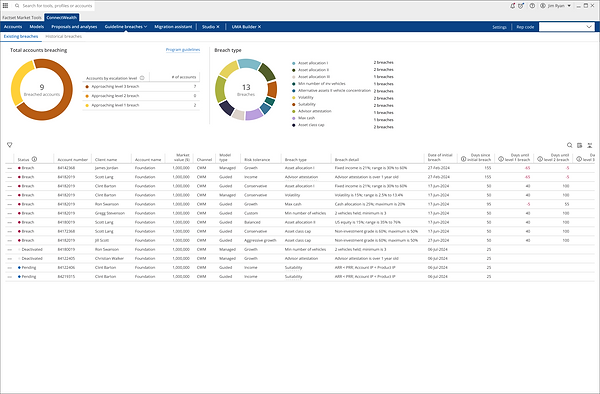
Alerts across the book, actionable, for all account types
-
Provides a way to navigate to relevant applications and action on next steps - Make alerts task oriented, linking to relevant application to resolve alert
-
Insights and opportunities to deepen client relationships

.png)
.png)


.png)
.png)

.png)


